Geometry transformation calculator.

Transform a polygon by translation, reflection, rotation or dilation. The calculator plots the original shape and its image on the same equal-scale grid, lists corresponding coordinates, and creates a practice worksheet with a separate answer key.

EXPLORE · PRACTISE · PRINTFree · No signup · Stays on your device

2 See how it works

Live preview

(x, y) → (x + (-5), y + (-2))

A (1, 1); B (4, 1); C (2, 4)

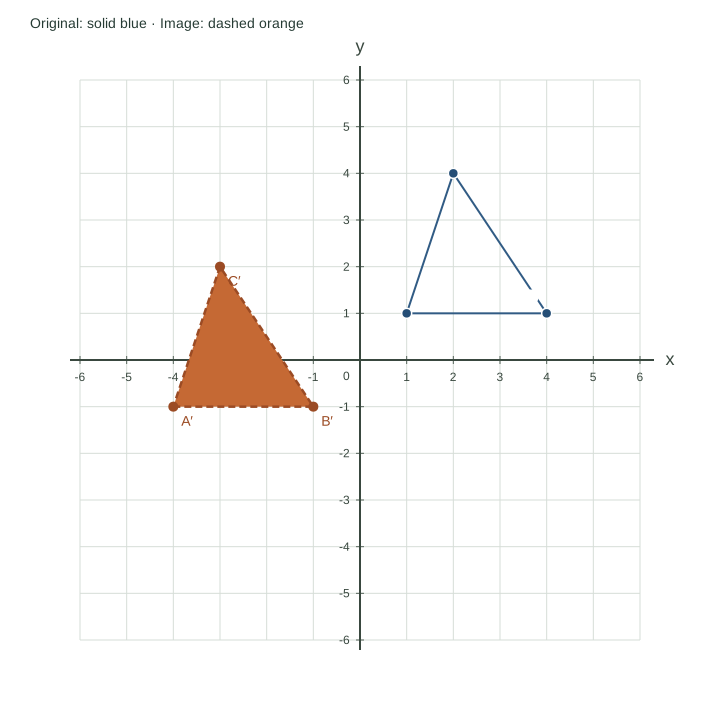
Coordinate planeX from -6 to 6; Y from -6 to 6. Grid interval 1. Equal units on both axes.-6-5-4-3-2-1123456-6-5-4-3-2-1123456xy0ABCA′B′C′Original: solid blue · Image: dashed orange

Step by step

A′ (-4, -1)

B′ (-1, -1)

C′ (-3, 2)

Side lengths and angle measures are preserved.

Values used in this example
VertexOriginal XOriginal YImage XImage Y
A11-4-1
B41-1-1
C24-32

One transformation at a time. Equal X/Y units, automatic range including every vertex. Original: solid blue; image: dashed orange. Overlapping vertices may overlap labels; the table preserves every coordinate.

3 Download & use it

PDF includes the problem and space to work. Practice mode can add a separate answer key; Explore mode gives a worked page.

SVG and PNG match the diagram currently shown. CSV includes calculated values, even in practice mode.

Practice PDF page 1 keeps the answers hidden, even after revealing them on screen. PDF pages use high-resolution images.

How to use it

  1. Choose a transformation. Enter its shift, reflection line, rotation angle or scale factor and centre.
  2. Keep the sample triangle or paste 3–6 vertices in perimeter order, one labelled X/Y pair per line. The grid expands to include the complete original and image.
  3. Compare the solid blue original with the dashed orange image. In Practice mode, draw the image yourself before revealing it or printing the key.

Move every vertex by the same amount.

The original triangle has A (1, 1), B (4, 1) and C (2, 4). Translate it 5 units left and 2 units down: (x, y) → (x − 5, y − 2).

The image is A′ (−4, −1), B′ (−1, −1) and C′ (−3, 2). Each corresponding pair has the same horizontal and vertical change. The triangle keeps its size and shape. The prime mark distinguishes an image vertex from its original.

Free for class, homework and presentations. Two-page PDFs: question first, answer key second. Print in portrait at 100% / Actual size.

Move every vertex by the same amount.

Understand the result

Translation and reflection rules

Translation adds the same horizontal and vertical shift to every point. Reflection in the x-axis changes (x, y) to (x, −y); reflection in the y-axis changes it to (−x, y). The diagonal options swap coordinates for y = x, or negate and swap them for y = −x. A dashed reference line identifies the mirror.

Rotation needs a centre and a direction

About the origin, 90° anticlockwise maps (x, y) to (−y, x); 180° maps it to (−x, −y); and 270° anticlockwise maps it to (y, −x). For another centre, subtract that centre, rotate the relative coordinates, then add it back. Here 270° anticlockwise is also labelled 90° clockwise.

Dilation changes distances from the centre

For centre (h, k) and positive scale factor s, the new point is (h + s(x − h), k + s(y − k)). Side lengths multiply by s and area by s². Factors from 0.1 to 5 are supported; a factor below 1 reduces the shape. Translations, reflections and rotations preserve side lengths.

Supported shapes and limits

Use a simple polygon with 3–6 distinct vertices entered around its perimeter. Zero-area and crossing shapes are rejected. Input and output coordinates must stay within −50 to 50. This tool applies one transformation at a time, with no matrix input or automatic composition. A4/Letter PDFs use a separate answer page; CSV includes original and image coordinates.

Further reference: GeoGebra manual: transformation tools. Examples, tool design and practice sheets on this page are original ChartsAI work; no affiliation is implied.

Common questions

Can I rotate around a point other than the origin?

Yes. Enter Centre X and Centre Y for rotation or dilation. A small cross marks the centre on the diagram. Rotation angles are limited to quarter, half and three-quarter turns.

Can I reflect across any line?

This version supports the x-axis, y-axis, y = x and y = −x. An arbitrary line or a function transformation is outside this tool’s scope.

Why has the grid changed size?

The range automatically includes every original and transformed vertex and the selected centre. X and Y units remain equal. A result beyond −50 to 50 produces an error rather than hiding a vertex.

Another way to see the maths.

Number line generator

For locating numbers, explaining addition and subtraction, and learning interval notation.

Slope calculator

For connecting two ordered pairs to rise, run, gradient and the equation of a straight line.

Quadratic graph calculator

For learning how a quadratic equation, its key features and a plotted parabola describe the same function.

Start with coordinate-plane plotting practice, or browse all free math tools.